Note: this is an example for reference only please use the VxRail installation procedures & services provided by Dell. This is the first in a series of posts covering VCF On […]
The following provides a method of cleaning out unwanted bundles from SDDC Manager. Firstly browse to the Bundle section on SDDC UI, select the bundle you wish to remove and click view details: From here you can gather the Bundle ID which is required by the bundle cleanup utility: At this point it is good practice to take a snapshot […]
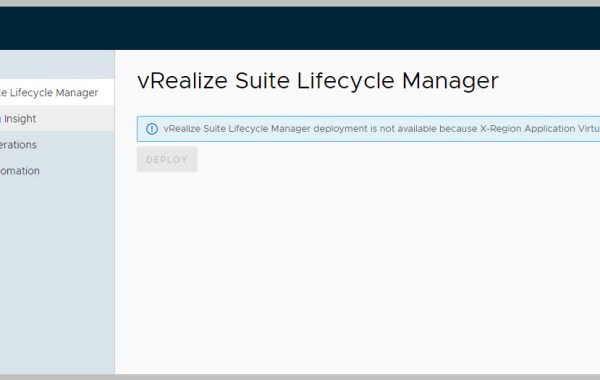
In this scenario I upgraded from 3.10 to 3.11 in advance of deploying vRSLCM; this required me to reset feature.vcf.avn.freenfield to status of ‘true’:
VMware Cloud Foundation 4.4 on Dell VxRail 7.0.320 is now available. The following is a list of all the components and their versions as per VMware Cloud Foundation 4.4. Security Update: VCF 4.4 On VxRail 7.0.320 includes the critical Apache Log4j Remote Code Execution Vulnerability fixes. Some other notable highlights of this VCF 4.4 release include: vRealize LCM initiated from vRSLCM […]
This is a known issue and documented in the release notes: ‘If bring-up fails when deploying the second Platform Services Controller (psc-2), retrying bring-up will fail with the error Failed to apply default vSAN policy. The cause is that the original deployment of psc-2 was not removed from the vCenter Server inventory.’ Release notes: https://docs.vmware.com/en/VMware-Cloud-Foundation/3.10/rn/vmware-cloud-foundation-on-dell-emc-vxrail-18-release-notes.html The workaround as per detailed in […]
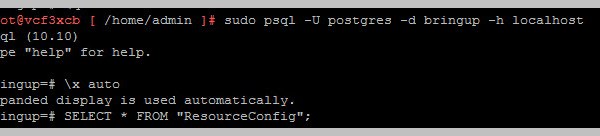
Issue: NSX Datacenter license used in parameter xls was expired, resulting in a failure during bring-up. Rather than rolling back the bring-up I edited the NSX lic entry in postgres […]
The definition of a VxRail Dynamic node: ‘VxRail systems that are compute-only nodes used to form a vSphere cluster.’ This essentially means that a VxRail Dynamic node cluster relies on having external storage acting as primary. Support for HCI Mesh and FC based external storage compute-only clusters was introduced as part of the VxRail 7.0.240 release. These compute-only ESXi VxRail […]
One method of consuming the available VxRail APIs is by leveraging the VxRail API PowerShell Modules Package from within your Windows OS using PowerShell. Each public API has a corresponding […]
See also related Post: https://davidring.ie/2019/09/18/vxrail-lookup-model-psnt/ In addition to the physical tag at the front of the VxRail appliance you may also leverage PowerCLI, ESXi console or vCenter GUI to pull the ST/SN of each VxRail appliance. PowerCLI Get-Hosts -Server VxRailManager_IP -Username administrator@vsphere.local -Password PW |ft sn, hostname ESXi Console Per individual host: /opt/vxrail/tools/ipmitool fru print 17 vCenter UI With the […]
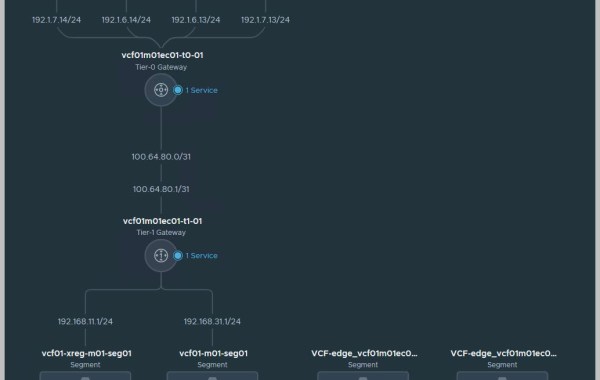
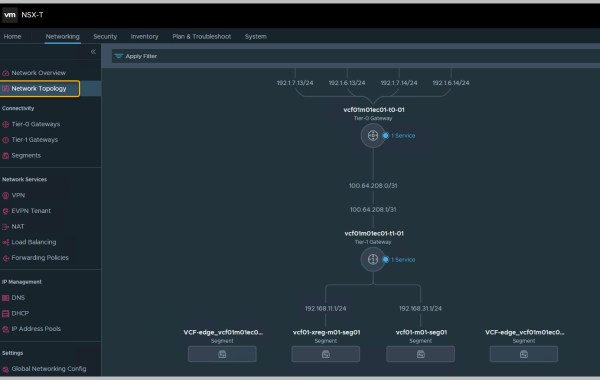
Prior to VCF 4.3 Application Virtual Networks(AVN)s including the NSX Edge Cluster and NSX network segments were deployed and configured during bring-up by Cloud Builder. Example of this process can […]
One method of consuming the available VxRail APIs is by leveraging the VxRail API PowerShell Modules Package from within your Windows OS using PowerShell. Each public API has a corresponding PowerShell cmdlet included in the VxRail PowerShell modules starting with VxRail 4.7.300. The API User Guide can be found here: https://support.emc.com/docu91468_VxRail-Appliance-4.5.x,-4.7.x,-and-7.0.x-API-Guide.pdf?language=en_US Steps to install the VxRail API PowerShell Modules Package […]
This is the third post in a series of posts covering VCF On VxRail 4.2. The previous posts detailed an example walkthrough covering the process of: Deploying a VxRail Management Workload Domain cluster Deploying VMware CloudBuilder for VxRail Bring-Up of VCF 4.2 Deploying a VI WLD Part 1 & Part 2 Versions used in this example are VCF 4.2 & VxRail 7.0.131. Release Notes: https://docs.vmware.com/en/VMware-Cloud-Foundation/4.2/rn/vmware-cloud-foundation-on-dell-emc-vxrail-22-release-notes.html […]
Note: this is an example for reference only please use the VxRail installation procedures & services provided by Dell. This is the second in a series of posts covering VCF On […]
Note: this is an example for reference only please use the VxRail installation procedures & services provided by Dell. This is the first in a series of posts covering VCF […]
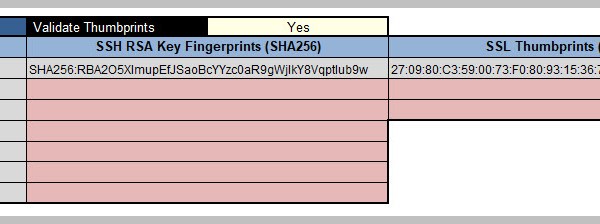
In order to prevent the opportunity of a Man In The Middle (MiTM) attack VMware have introduced a security feature which validates the SSH RSA fingerprint and SSL thumbprint of […]
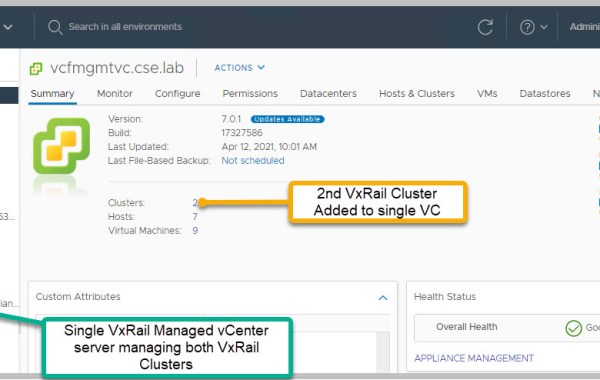
‘Can a single vCenter server support/manage multiple VxRail clusters?’ Let me first explain the two methods of deploying a vCenter server to support a VxRail cluster: VxRail Managed vCenter Server […]
VxVerify – Pre-upgrade Health Check Tool VxVerify is an incredibly useful tool to have at your disposal while working with VxRail. Complimentary to the native VxRail manager checks VxVerify performs […]
Switch model: S4048-ON Code Version: 9.10(0.1) 48 Ten GigabitEthernet/IEEE 802.3 interface(s)6 Forty GigabitEthernet/IEEE 802.3 interface(s) Brief detail in relation to setting Layer-2 switchport mode on all 48x10GbE ethernet interfaces to support L2 VLAN based networking: cork-vxrail1-tor#conf tcork-vxrail1-tor(conf)#interface range tengigabitethernet 1/1-1/48cork-vxrail1-tor(conf-if-range-te-1/1-1/48)#switchportcork-vxrail1-tor(conf-if-range-te-1/1-1/48)#no shutcork-vxrail1-tor(conf-if-range-te-1/1-1/48)#exitcork-vxrail1-tor(conf)#exitcork-vxrail1-tor# To revert to non switchport mode: cork-vxrail1-tor#conf tcork-vxrail1-tor(conf)#interface range tengigabitethernet 1/1-1/48cork-vxrail1-tor(conf-if-range-te-1/1-1/48)#no switchportcork-vxrail1-tor(conf-if-range-te-1/1-1/48)#exitcork-vxrail1-tor(conf)#exitcork-vxrail1-tor#
I hit the following issue recently while creating a VCF 4.1 ‘NSX-T VI Workload Domain‘ for a VCF on VxRail solution: Referring to the VMware VCF 4.0.1 Release Notes (extract): VI workload domain creation or expansion operations fail If there is a mismatch between the letter case (upper or lower) of an ESXi host’s FQDN and the FQDN used when […]




 DavidRing.ie