Note: this is an example for reference only please use the VxRail installation procedures & services provided by Dell.
The following detailed post provides an example walkthrough covering the process of:
- Deploying a VxRail Management Workload Domain cluster
- Deploying VMware CloudBuilder for VxRail
- Bring up of VCF
- Deploying a VxRail Virtual Infrastructure NSX-T Based Workload Domain cluster
- Deploying vRSLCM
- Deploying vROPs
Versions used in this example are VCF 3.9.1 & VxRail 4.7.410.
The end result of this example build is that of a single site VCF on VxRail solution including a single NSX-T VI Workload Domain (thanks to @HeagaSteve for the architectural diagram):
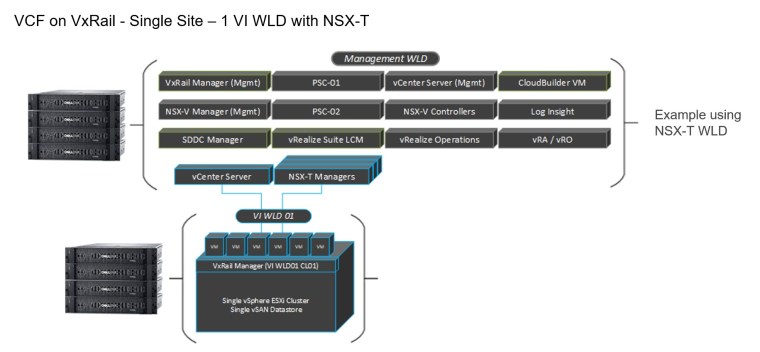
Management Workload Domain Creation
The VxRail bring-up of the Management Cluster is similar to a standard VxRail bring-up with embedded vCenter and PSC being deployed, selecting None for Logging as vRealize Log Insight is deployed later in the Management Workload Domain during the VCF Bring-Up process. Tasks include:
- VxRail Mgmt WLD cluster bring-up
- Enable Customer Experience Improvement Program (CEIP)
- Externalize the vCenter using VxRail Manager plugin from the vCenter HTML client
- Test the cluster shut down command to confirm externalization was successful
- Change the Management port group to Ephemeral port type
- Rename DC, Cluster, VDS, vSAN
This slideshow requires JavaScript.
Deploy CloudBuilder
VMware Cloud Builder OVA downloaded from VMware.com and deployed:
This slideshow requires JavaScript.
VCF Bring-Up
The following section details the VCF on VxRail Bring-Up. At this stage the Cloud Builder VM has been deployed, powered on and user logged into the Cloud Builder UI, from here you proceed as follow:
- Download the parameter Sheet from Cloud Builder
- Populate the Parameter sheet based on network and environment specifics
- Validate the Parameter sheet values
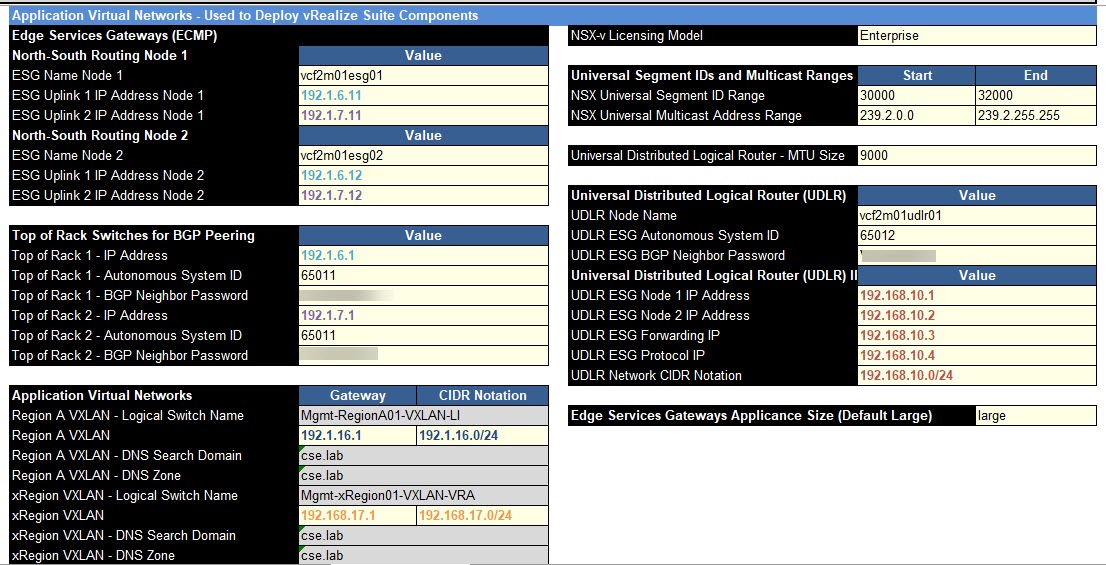
3.9.1 introduced the concept of Application Virtual Networks (AVNs), below is a screen capture of the parameter sheet including the required AVN entries and BGP Peering details:
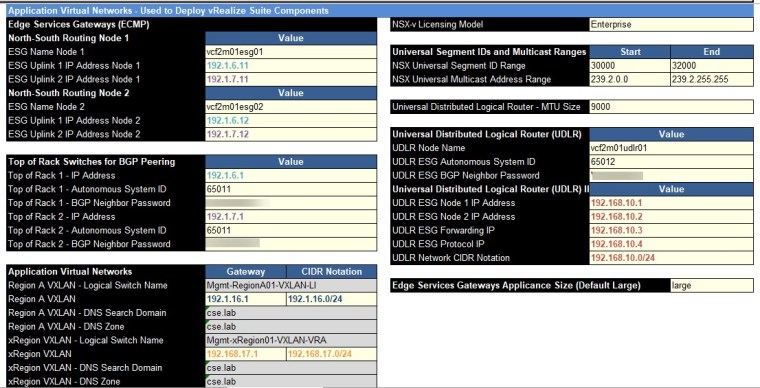
Before proceeding with the VCF bring-up it is good practice to create snapshots of the following virtual machines in the result that a rollback is required:
- VMware vCenter Server Appliance
- VMware vCenter Server Platform Services Controller
- VMware Cloud Builder
- VxRail Manager
During bring-up the following components are automatically deployed and configured:
- Additional PSC
- Log Insight Cluster
- SDDC Manager
- NSX Manager and Controller cluster
On completion of VCF Bring-up we review the Management Domain VMs created in vCenter by the VCF Bring-Up process including AVN and confirm automatic IP assignment from the DHCP IP pool for the NSX-V Virtual Tunnel Endpoints (VTEPs).
Coud Builder generates a JSON file for the management cluster from the uploaded config file, this vcf-vxrail.json file can be found in:
/opt/vmware/sddc-support/cloud_admin_tools/Resources/vcf-vxrail/
This slideshow requires JavaScript.
NSX-T VI Workload Domain Creation
This slideshow requires JavaScript.
Deploy vRSLCM
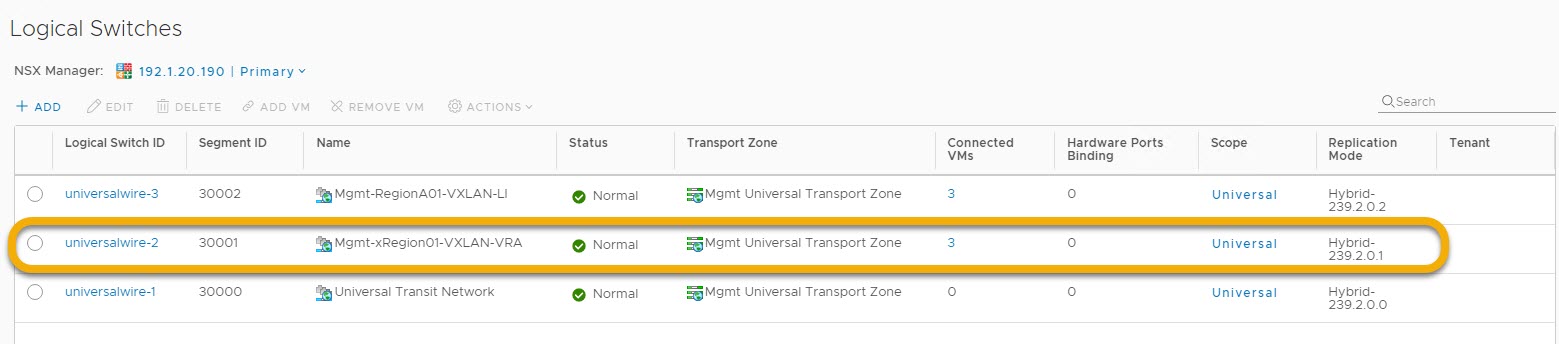
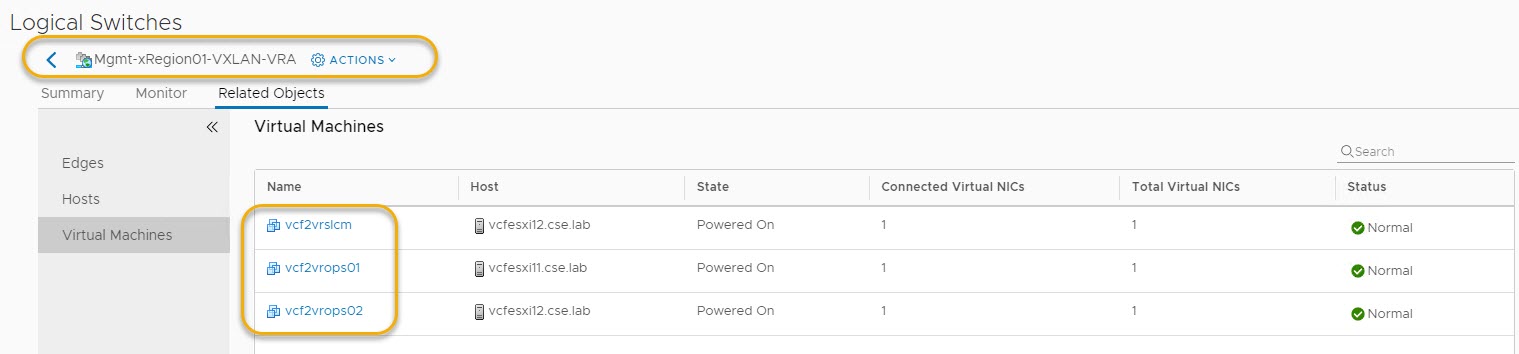
You will notice that vRSLCM & vROPs get deployed to the AVN ‘Mgmt-xRegion01-VXLAN-VRA’ which was created as part of the VCF bring-up process highlighted earlier: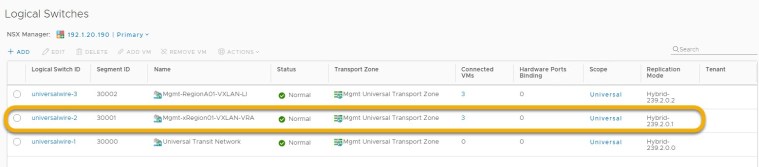
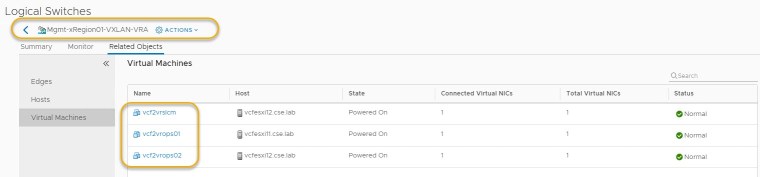
This slideshow requires JavaScript.
Deploy vROPs
This slideshow requires JavaScript.
Note: this is an example for reference only please use the VxRail installation procedures provided by Dell EMC.
Related Posts:
Firewall ports required to access Cloud Foundation
VCF on VxRail MGT WLD VMs
Deploying VCF on VxRail MGT WLD
Deploying VCF on VxRail – Understanding What does What






 DavidRing.ie
Very nice – thanks for this.
Thanks Denis!