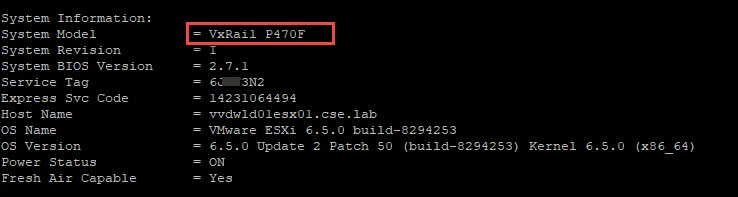
One method of pulling useful VxRail node details such as:
- VxRail Model
- Hostname
- ESXi version
- Service tag details
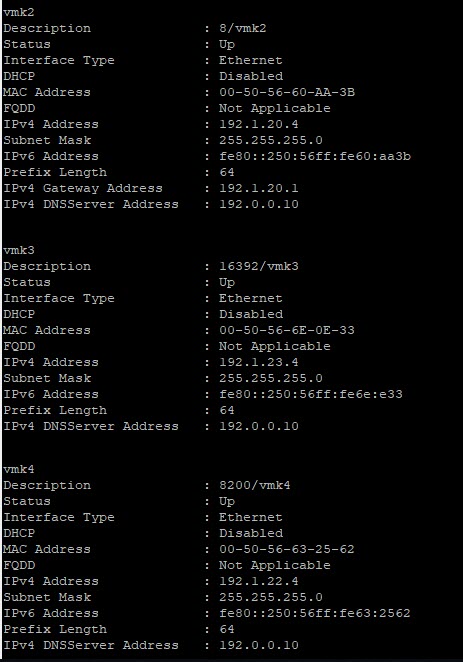
- NIC MAC Addresses
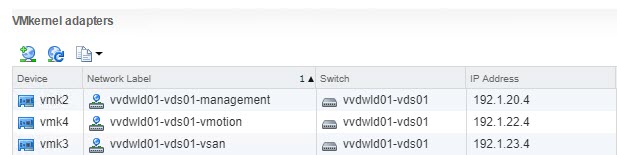
- VMkernel interfaces
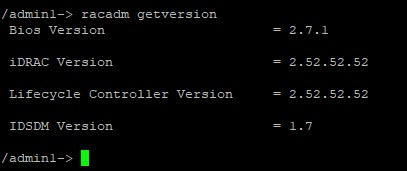
- Firmware details
Is via connecting directly to the iDRAC IP using SSH. After logging into the SSH console with root credentials the firmware RACADM is accessible. From the /admin1-> prompt enter the required racadm command. In order to get all the details outlined above you can is a single command:
/admin1-> racadm getsysinfo
Other useful commands:
Get Service Tag
/admin1-> racadm getversion
Firmware Versions
/admin1-> racadm getversion
VMkernel Adapters
/admin1-> racadm gethostnetworkinterfaces

LED
/admin1-> racadm getled
LED State : Not-Blinking
HELP
/admin1-> racadm help
For more information, see the Integrated Dell Remote Access User’s Guide at Dell.com/idracmanuals.






 DavidRing.ie