Uncategorized
VxRail Manager – Manual Backup
Note: Please refer to the DELL EMC Solve procedures before performing this task, this is for example purposes only, running VxRail code 4.5.210. This is an example of a manual […]
Virtualization & Storage

Note: Please refer to the DELL EMC Solve procedures before performing this task, this is for example purposes only, running VxRail code 4.5.210. This is an example of a manual […]
Note: Please refer to the DELL EMC Solve procedures before performing this task, this is for example purposes only, running VxRail code 4.5.210.
This is an example of a manual file-based backup of your VxRail Manager config, which is invaluable in the event you are required to recover the VxRail Manager.
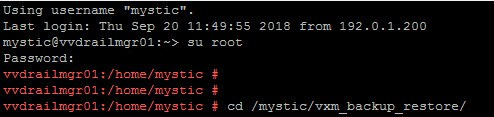
In this example I accessed the VxRail Manager via SSH with mystic account, su to root and navigate to the backup script directory:
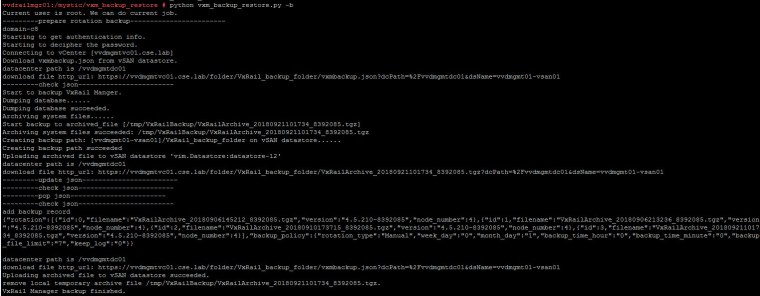
The following command executes the backup script:
python vxm_backup_restore.py -b
If you wish to include the logs in the backup then append with --keeplog:
python vxm_backup_restore.py -b --keeplog
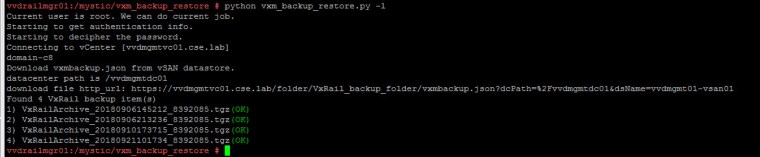
The following command lists all the backups taken:
python vxm_backup_restore.py -l
Log file location:
/var/log/mystic/VxRailBackupRestore.log
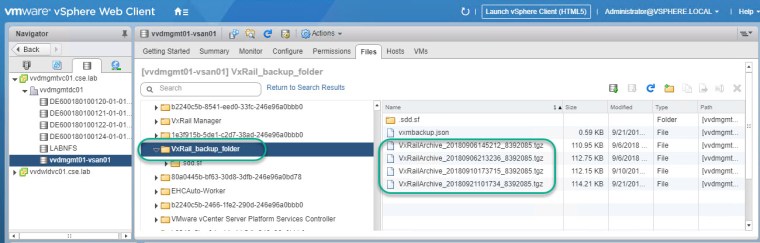
The backups are stored on the associated vCenter vSAN Datastore:
The solve procedures also explain how to configure VxRail Manager for a scheduled automated backup of the config.




 DavidRing.ie