The following post details how to view task information via CLI on an ESXi host. Task details such as: Snapshot operations, for example create/delete/consolidate Clone operations As can be seen […]
The following post details how to view task information via CLI on an ESXi host. Task details such as:
Snapshot operations, for example create/delete/consolidate
Clone operations
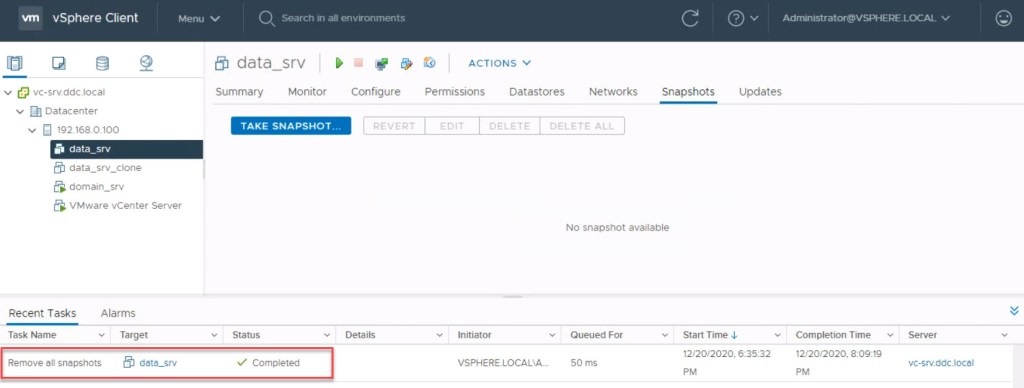
As can be seen from the vSphere UI a ‘Remove all snapshots’ task is in operation:
Connecting directly to the ESXi mgmt IP using SSH and issuing the 'vim-cmd vimsvc/task_list'command we can view the running task. We can also determine the associated vmid which is 4 in this example:
The following 3 images detail how to list all running VMs, the associated tasks for a VM based on it’s vmid and using the task id to return more granular details of the running task, such as state/start time/percentage complete:
vim-cmd vmsvc/getallvms
vim-cmd vmsvc/get.tasklist vmid
vim-cmd vimsvc/task_info task_id
To gather snapshot details for a particular VM:
vim-cmd vmsvc/get.snapshotinfo vmid
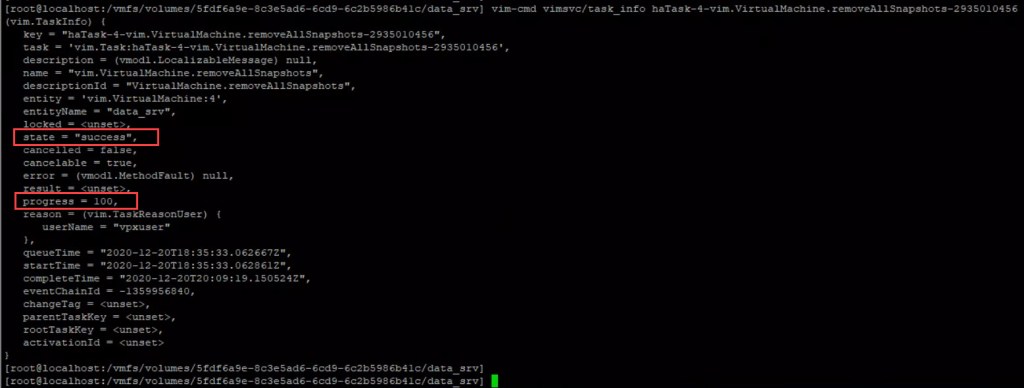
As can be seen from the vSphere UI the removal of snapshots task has completed and we re-run the task_info cmd to view the final summary of the task:
Additional useful commands to determine presence of snapshot files in the associated VM datastore:










 DavidRing.ie