EMC XtremIO – Redeploying XMS (XtremIO Management Server)

If the situation ever arises where you have lost your XtremIO Management Server (XMS) – do not worry as you can quite easily recover the XMS to its previous state. In this scenario even though you may have lost your XMS any I/O to the cluster is unaffected since the XMS is not in the data path. Therefore an XMS failure will only affect any configuration or monitoring activities of the XtremIO Array and production host I/O will continue as normal. There may be different scenarios of failure since there exists an option for either a physical or virtual XMS; for example in a virtual environment someone may accidentally delete the XMS VM entirely (yes this can happen!).

These are the steps involved to redeploy your XtremIO XMS; it really is a straight forward process since the database is stored on the controllers and during the recovery process the XMS will sync up with the controllers in order to gather all the existing configuration required to return your management console to working order.

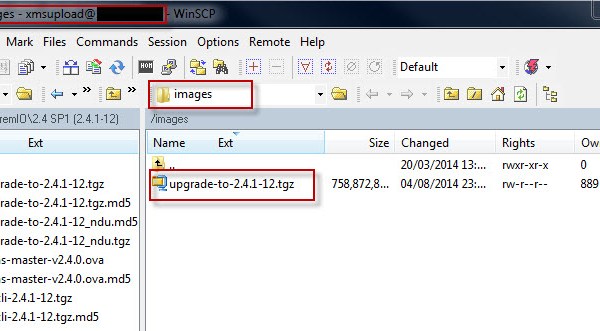
The first step is to re-install the XMS image, in the event it is a physical XMS then you may install an image via a USB flash drive or for a virtual XMS simply deploy the provided VMware OVA image. The following step is to upload the XMS software to the images directory of the XMS and login with install mode ……..
XMS_Redeploy6

Once logged into the XMS console with xinstall then perform the following sequence of steps:
1. Configuration
5. Perform XMS installation only
11. Run XMS Recovery

XMS_Redeploy5

Options to choose when running the “XMS Recovery”:

XMS_Redeploy3

Completion:
XMS_Redeploy4

EMC VNXe – Gen1&2 Backup Script (Powershell & UEMCLI)

——————————————————————-
Reference:: EMC® VNXe® Unisphere® Command Line Interface User Guide:

Collect -Config: Create a snapshot of the current system configuration and save it to a file. It captures all of the data necessary to recreate the current configuration on a new or reinitialized system. It does not capture log files or other types of diagnostic data.

Collect -serviceInfo: Collect information about the system and save it to a .tar file. Service providers can use the collected information to analyze the system.
——————————————————————-

Using native UEMCLI commands integrated with Powershell this script automates the process of backing up the current VNXe configuration along with the latest system log files. You will just need to Complete a few simple user entries:
◊ Backup Directory
◊ Mgmt IP Address
◊ Service Password

The script will automatically create a sub-directory in the backup location provided. For example if you input a backup directory of C:\VNXe this will result in a backup location of C:\VNXe\timeDate

Example Script Execution
VNXe_Backup1

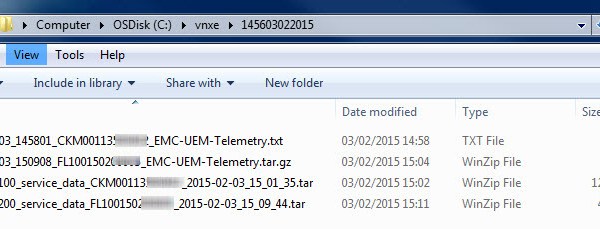
The backup directory location will automatically open on completion of the script:
VNXe_Backup2

Download: VNXe_Backup.ps1 and remove the .doc extension! Or in full text format below:

 
#################################
#
# Reference: VNXe UEMCLI Docs
# Script:VNXe BACKUPS
# Date: 2015-02-10 17:30:00										 			 
#
# Version Update:                                         
# 1.0 David Ring            	
#					 
#################################

######## Banner ########
Write-Host " "
Write-Host "#########################################################"
Write-Host "#######       VNXe Config and LOGS Backup        ########"
Write-Host "#########################################################"
Write-Host " "


##### Backup Location #####
$BackupLocation = Read-Host "Backup Location:(A sub-dir with the current Time & Date will be created):"
$BackupLocation = (join-path -Path $BackupLocation -ChildPath "$(date -f HHmmddMMyyyy)")	
IF(!(Test-Path "$BackupLocation")){new-item "$BackupLocation" -ItemType directory | Out-Null}
$BackupLocation =  "`"$BackupLocation`""

Write-Host "Backup Location Entered:" $BackupLocation

Start-Sleep -s 3

########################
### VNXe GEN1 Backup ###
########################
$VNXe = Read-Host 'VNXe 3150/3300 Present? y/n:'
if ($VNXe -eq "y") {
$VNXeIP = Read-Host 'VNXe IP Address:'
$VNXePW = Read-Host 'VNXe Service Password:'
Write-Host " "
Write-Host "########################################"
Write-Host "#######  VNXe 3150/3300 Backup  ########"
Write-Host "########################################"
Write-Host " "
Write-Host "VNXe IP Address:" $VNXeIP
Write-Host "VNXe Service Password:" $VNXePW
Write-Host " "
Start-Sleep -s 3
$VNXeConfig = (uemcli.exe -d $VNXeIP -u service -p $VNXePW -download -d $BackupLocation config)
Write-Host "### VNXe Config Backup Complete. ###"
Write-Host " "
Write-Host "### Now Generating VNXe Log Files! ###"
$VNXeConfig = (uemcli.exe -d $VNXeIP -u service -p $VNXePW /service/system collect -serviceInfo)
$VNXeConfig = (uemcli.exe -d $VNXeIP -u service -p $VNXePW -download -d $BackupLocation serviceInfo)
Write-Host " "
Write-Host "##################################################"
Write-Host "#######    VNXe GEN1 Backup Complete      ########"
Write-Host "##################################################"
Write-Host " "
}


########################
### VNXe GEN2 Backup ###
########################
$VNXe = Read-Host 'VNXe 3200 Present? y/n:'
if ($VNXe -eq "y") {
$VNXeIP = Read-Host 'VNXe IP Address:'
$VNXePW = Read-Host 'VNXe Service Password:'
Write-Host " "
Write-Host "####################################"
Write-Host "########  VNXe 3200 Backup  ########"
Write-Host "####################################"
Write-Host " "
Write-Host "VNXe IP Address:" $VNXeIP
Write-Host "VNXe Service Password:" $VNXePW
Write-Host " "
Start-Sleep -s 3
$VNXeConfig = (uemcli.exe -d $VNXeIP -u service -p $VNXePW /service/system collect -config -showPrivateData)
$VNXeConfig = (uemcli.exe -d $VNXeIP -u service -p $VNXePW -download -d $BackupLocation config)
Write-Host "### VNXe Config Backup Complete. ###"
Write-Host " "
Write-Host "### Now Generating VNXe Log Files! ###"
$VNXeLOGS = (uemcli.exe -d $VNXeIP -u service -p $VNXePW /service/system collect -serviceInfo)
$VNXeLOGS = (uemcli.exe -d $VNXeIP -u service -p $VNXePW -download -d $BackupLocation serviceInfo)
Write-Host " "
Write-Host "##################################################"
Write-Host "#######     VNXe GEN2 Backup Complete     ########"
Write-Host "##################################################"
Write-Host " "
}

Start-Sleep -s 3

$BackupLocation = $BackupLocation -replace '"', ""
invoke-item $BackupLocation

Read-Host "Confirm Presence of 'Config File' and 'LOG Files's' in the Backup Directory!"

######################## END ########################