Removing PowerPath/VE From vSphere Host(s) using ESXCLI/PowerCLI

In the event you have a requirement to uninstall PowerPath/VE from a vSphere host. The first series of steps outline how to remove PP/VE from a single host. If you need to remove PP/VE from a cluster of hosts then please see the PowerCLI section below.

1. Firstly enable SSH on the Host in order to issue the ESXCLI cmds:
pp_remove_3

2. Retrieve the names of the Powerpath packages installed on the vSphere host by typing:
# esxcli software vib list
# esxcli software vib list | grep power
remove_pp_from_esx_1
Note: VIB stands for vSphere Installation Bundle

3. Using the package names remove the PowerPath/VE package by issuing the following command:
# esxcli software vib remove -n powerpath.cim.esx -n powerpath.plugin.esx -n powerpath.lib.esx
remove_pp_from_esx_2

4. After a successful uninstall reboot the host:
Enter Maintenance Mode: esxcli system maintenanceMode set –enabled=true
Reboot Host: esxcli system reboot –reason=”Uninstalling Powerpath/VE”

5. Exit Maintenace Mode on completion of Reboot:
Exit Maintenance Mode: esxcli system maintenanceMode set –enabled=false

Using PowerCLI To Remove Powerpath From Cluster Hosts
1. Connect to vCenter and enable SSH on all hosts in your specified cluster:
Connect-VIServer -Server ‘vCenter_IP’ -User ‘administrator@vsphere.local’ -Password ‘Password’
Get-Cluster YourClusterName | Get-VMHost | ForEach {Start-VMHostService -HostService ($_ | Get-VMHostService | Where {$_.Key -eq “TSM-SSH”})}

2. Confirm the presence of PP/VE on the cluster hosts:
$hosts = Get-Cluster YourClusterName | Get-VMHost
forEach ($vihost in $hosts)
{
$esxcli = get-vmhost $vihost | Get-EsxCli
$esxcli.software.vib.list() | Where { $_.Name -like "*powerpath*"} | Select @{N="VMHost";E={$ESXCLI.VMHost}}, Name, Version
}

3. Remove PP/VE from all the hosts in the cluster:
$hosts = Get-Cluster YourClusterName | Get-VMHost
forEach ($vihost in $hosts)
{
$esxcli = get-vmhost $vihost | Get-EsxCli
$PPVE=$esxcli.software.vib.list() | Where { $_.Name -like "*powerpath*"}
$PPVE | ForEach { $esxcli.software.vib.remove($false,$true,$false,$true,$_.Name)}
}

4. Enter each host in maintenance mode and reboot (use with caution!):
$hosts = Get-Cluster YourClusterName | Get-VMHost
forEach ($vihost in $hosts)
{
$esxcli = get-vmhost $vihost | Get-EsxCli
$esxcli.system.maintenanceMode.set($true)
$esxcli.system.shutdown.reboot(10,"UninstallingPP")
}

5. Disable SSH on all hosts in the cluster:
Get-Cluster YourClusterName | Get-VMHost | ForEach {Stop-VMHostService -HostService ($_ | Get-VMHostService | Where {$_.Key -eq “TSM-SSH”}) -Confirm:$FALSE}

Notes:
Useful cmds to check status of LUN Connectivity:

Check VMKernel Log for PowerPath Errors: cat /var/log/vmkernel.log | grep PowerPath
2014-07-10T04:42:00.320Z cpu8:33448)ALERT: PowerPath:MpxRecognize failed. Path vmhba1:C0:T0:L255 not claimed
2014-07-10T04:42:00.320Z cpu8:33448)ALERT: PowerPath:Could not claim path vmhba1:C0:T0:L255. Status : Failure
2014-07-10T04:42:00.320Z cpu8:33448)WARNING: ScsiPath: 4693: Plugin 'PowerPath' had an error (Failure) while claiming path 'vmhba1:C0:T0:L255'. Skipping the path.
2014-07-10T04:42:00.320Z cpu8:33448)ScsiClaimrule: 1362: Plugin PowerPath specified by claimrule 260 was not able to claim path vmhba1:C0:T0:L255. Busy

esxcfg-mpath –l command
~ # esxcfg-mpath -l command
fc.20000024ff3dd55b:21000024ff3dd55b-fc.500009730025c000:500009730025c1a5-
Runtime Name: vmhba1:C0:T0:L255
Device: No associated device
Device Display Name: No associated device
Adapter: vmhba1 Channel: 0 Target: 0 LUN: 255
Adapter Identifier: fc.20000024ff3dd55b:21000024ff3dd55b
Target Identifier: fc.500009730025c000:500009730025c1a5
Plugin: (unclaimed)
State: dead
Transport: fc

esxcli storage core path list fc.20000024ff3dd55b:21000024ff3dd55b-
~ # esxcfg-mpath -l command
fc.20000024ff3dd55b:21000024ff3dd55b-fc.500009730025c000:500009730025c1a5-
Runtime Name: vmhba1:C0:T0:L255
Device: No associated device
Device Display Name: No associated device
Adapter: vmhba1 Channel: 0 Target: 0 LUN: 255
Adapter Identifier: fc.20000024ff3dd55b:21000024ff3dd55b
Target Identifier: fc.500009730025c000:500009730025c1a5
Plugin: (unclaimed)
State: dead
Transport: fc

Cisco MDS – How To Remove Zones from an Active Zoneset

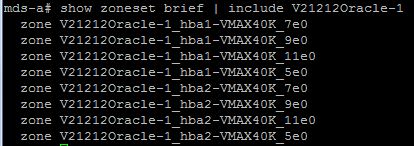
1. Firstly we need to know the specific names of the Zones that we intend to delete. To gather the full list of zone members within a Zoneset run show zoneset vsan xx. The output will return all of the member names for the Zoneset, the output can be reduced if you know the naming conventions associated with the hosts; for example if the Zone names begin with V21212Oracle-1 then issuing the command show zoneset brief | include V21212Oracle-1 will return in this case all the Zones associated with Oracle-1:
RZ1

2. To View the active Zones for Oracle-1 within the Zonseset: show zoneset active | include V21212Oracle-1
RZ2

3. Example of Removing half the Zones (Paths) associated with host Oracle-1 from the active Zoneset name vsan10_zs:
config t
zoneset name vsan10_zs vsan 10
no member V21212Oracle-1_hba1-VMAX40K_9e0
no member V21212Oracle-1_hba1-VMAX40K_11e0
no member V21212Oracle-1_hba2-VMAX40K_7e0
no member V21212Oracle-1_hba2-VMAX40K_5e0

4. Re-activating the Zoneset vsan10_zs after the config changes of removing the specified Zoneset members:
zoneset activate name vsan10_zs vsan 10
zone commit vsan 10

5. Finally removing the Zones from the configuration:
no zone name V21212Oracle-1_hba1-VMAX40K_9e0 vsan 10
no zone name V21212Oracle-1_hba1-VMAX40K_11e0 vsan 10
no zone name V21212Oracle-1_hba2-VMAX40K_7e0 vsan 10
no zone name V21212Oracle-1_hba2-VMAX40K_5e0 vsan 10
zone commit vsan 10
end
copy run start

Confirm configuration contains the correct Active Zoning:
show zoneset brief | include V21212Oracle-1
show zoneset active | include V21212Oracle-1

RZ3

EMC VMAX – Data Device (TDAT) Draining From A Thin Pool

Draining of a Data Device (TDAT) from a VMAX Thin Pool is a non-disruptive activity, meaning TDAT’s can be removed from a Thin Pool without the need to unbind any TDEV’s with allocated extent’s residing on the TDAT. There may be many reasons why you wish to perform such an action, in my case it was to re-allocate the TDAT’s to another Pool helping to reuse space in order to improve efficiency. Another example is where you may wish to replace a drive(s) with a newer model (higher capacity required) and you need to move off any Production data that resides on the existing drives in preparation for the replace operation.

The Draining and removal process is essentially a 3 phase operation:
1. Disabling the TDAT effectively initiates Draining on the device. Once the TDAT gets disabled within the Pool, used tracks on the device get moved to the remaining enabled devices in the Pool non-disruptively.
2. On completion of the Draining process the TDAT device enters a disabled state.
3. Once in a disbaled state the TDAT can be removed from the Thin Pool.

Performing the Drain Operation Via Unisphere
Navigating to Thin Pool ‘Boot-Pool’ the 8xTDAT volumes are displayed. The objective in this example is to demonstrate removing 25% of the devices (0903-0904). Fisrtly choosing volume 0904 and hitting the Disable Button:
Uni3
This immediately places the volume into a Draining state and any Data present on the device is balanced across the remaining enabled TDAT’s (08FD-0903) within the Thin Pool:
Uni4
The progress of the Drain is visible from Unisphere as the volume %used, GBused and GBfree are updated during the transition of the extents to other TDAT’s:
Uni5
Once the data volume completes the Drain process and displays an Inactive state then it is safe to hit Remove.
Uni6

Performing the Drain Operation Via Symcli
List details of the Thin Pool, providing data device information:
symcfg show -pool Boot-Pool -thin -all
CLI

Use the symconfigure command Disabling the data device 0903:
symconfigure -cmd “disable dev 0903 in pool BOOT-Pool, type=thin;” commit
Again viewing the Pool detail using the symcfg show -pool command, we can monitor the progress of the Drain operation:
CLI3

Removing the data device once the Drain operation is complete:
symconfigure -cmd “remove dev 0903 from pool BOOT-Pool, type=thin;” commit
CLI5