EMC Symmetrix VMAX – Viewing Port Details

When building a Vblock720 I use the following information to assist in Zoning and Masking of UCS Blades.

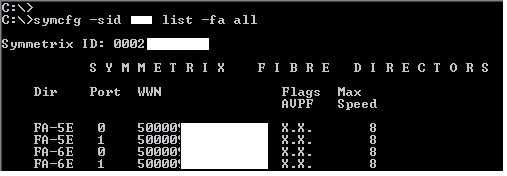
In order to gather the wwn’s of all the VMAX front-end director ports the following command is quite useful. (See screenshot below)

symcfg -sid XXX list -fa all

vmax_fa_all1

I also find the following command very helpful:
symcfg -sid XXX list -fa all -port
This will give you the list of all Front-End adapters on the VMAX displaying both online and connection status details. From the screenshot below you can see that FA-5E P0 and P1 are both online and P0 is connected (in our case it is connected to an Cisco MDS 9513 Multilayer Director). You can also see that while both FA-7H ports are online neither are connected to a port on the MDS. FA-7G both ports are online and both are connected to ports on MDS.

vmax_fa_port

In order to view the online status of all the Back-end director ports:
symcfg -sid XXX list -da all
From the output of this command you can also view the number of hyper volumes per port and how they are distributed accross the backend.

vmax_da_all

If you wish to display the online status of both Front-end and Backend ports through a single command:
symcfg -sid XXX list -dir all

VMAX_DIR_ALL

View Port status and connection status of RDF Ports:
symcfg list -RA ALL -PORT

RDF_PORT

List logins shows hosts logged into the port specified:
symaccess -sid XXX -dirport 1E:0 list logins

Using Unisphere for VMAX:

Front-End director ports:
Uni_FA

Backend director ports:
Here you see the 8 Director10 ports; physically there is only 2 backend ports on the director using QSFP it branches off to 4 connections to the system disk enclosures.
UNI_DA

RDF ports:
RDF_PORT_UNI

EMC RecoverPoint Journal and Replica Volume – Performance Considerations

In this post I will detail some considerations for RecoverPoint Journal and Replica Volumes from a Performance Perspective. This will give you some insight into the workings and designs that go into a RecoverPoint solution. EMC qualified personnel and performance tools are best placed to calculate 100% per customer requirements.

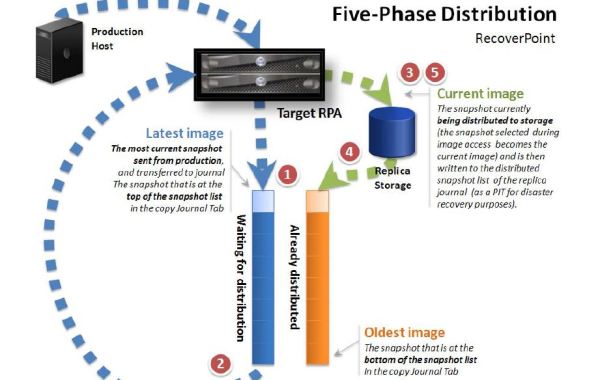
For every write on the Source Production Volume there will be five IO’s on the Target Side:
1. RPA Write to Journal Volume – sequential write to the Do Stream
2. RPA Read from Journal Volume – sequential read of the oldest data
3. RPA Read from Replica Volume – read current data from location to be written to
4. RPA Write to Journal Volume – write the current data so that the replica volume may be rolled back
5. RPA Write to Replica Volume – write the new data from the Do Stream to the replica volume

This five stage replication model is known as Five-Phase distribution and is the default distribution mode used by RecoverPoint. For more detailed information on the distribution phases and types please see the Administrator’s Guide at support.emc.com

The pattern of the IO therefore is 2*Read and 3*Write on the target side which is split between Journal and Replica Volumes. The exact breakdown of IO type is:
Journal Volume = 2 sequential writes and 1 sequential read
Replica Volume = 1 random read and 1 random write (Production Volume IO Pattern)

The IO’s to the Journal Volume are patched up together into large IOs, giving an IO profile on the Journal Volume of large sequential type IO workload. (3 sequential IOs to the streams)

The IO profile of the Replica Volume is the same as the write IO profile on the Source Volume plus reads of the same blocks; so for example if you have 8KB random writes on the source you will get 8KB random reads and then 8KB random writes to the same location on the Replica Volume.

The distribution to the Journal Volume uses large cumulative sequential writes independently of what the user I/O pattern is. Thus the Journal Volume should support at least 3 times the incoming rate of the Source Volume. (3x bandwidth of Source Volume, but not as much IOPs requirement)

Example of Journal Volume Throughput (MB/s) requirement:
So given an Application workload of 4000IOPs with an IO Pattern of 25% Write (1:3 W/R Ratio) and if the average IO Size=8KB you would need the disk throughput of:
1000IOPs * 8KB = 8000KB
8000KB * 3 = ~24MB/s (Throughput Requirement)
What matters is the throughput not the IO’s since the Journal Volume uses very large IO’s. EMC recommends running a benchmark such as IOMETER on the Journal Volume to measure the throughput performance.

Example of Replica Volume IOPs requirement:
However for the Replica Volume, those 1000 * 8KB write IO’s will translate to 1000 * 8KB Read misses + 1000 * 8KB Writes on the Replica Volume target device = 2000 IOPS requirement.

Remember these calculations are from the fact that the Journal Volume endures 2 writes and 1 read large sequential IOs, whereas the Replica Volume endures 1 write and 1 read random IOs for each 8KB write IO on Source Volume.

It is important to emphasise the Replica Volume performance. Often the performance of the Journal can overshadow the Replica performance requirements. It is important to be mindful of this when sizing solution’s, or a result of miss-calculation will result in “distribution too slow” warning messages which may lead to highloads (A highload is a bottleneck somewhere in the flow, that forces RecoverPoint to drop replication until it clears).

Another consideration to be mindful of is the performance on Failover of the Replica Volume as the Replica Volume needs to be capable of running the production systems during a failover (DR) situation. Many customers may consider a Replica Volume performance to be acceptable at 70% to 90% of Production (Source Volume) but other customers want 100% performance. In this situation IOPs figures will be a very important consideration on the Replica Volume.

Slow Journal Volume or slow Replica Volume may also have an impact on Journal Lag, in such a situation (increasing Journal Lag) investigation of the Replica and Journal performance characteristics may be a worthwhile exercise.

It is also good practice to allocate a dedicated RAID group for the Journal Volume(s) (RAID5 is a good option for large sequential IO performance). As pointed out above the IO pattern of the Journal Volume is large sequential IO thus it is best practice not to mix these LUNs with any LUNs of a random IO type profile.

As always these are my own ramblings and to always leverage EMC (or Partners) in devloping your optimum RecoverPoint solution. In a later post I will cover the WAN performance considerations along with Compression and Deduplication considerations.

5phase