EMC VNX – LUN MIGRATION

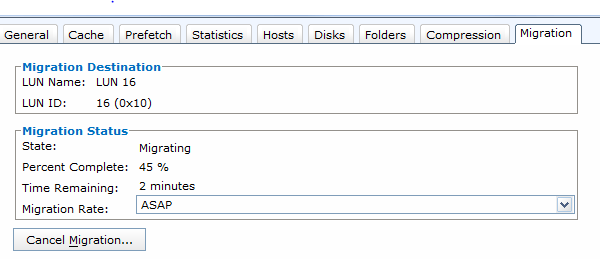
This post is a result of having to migrate Cisco UCS Blade boot LUNs between Raid Groups. Both the source and destination were Classic LUNs – RAID Group LUN (FLARE LUN/FLU). The migration occurred across two DAE’s, with each DAE populated with one Raid Group. This is the ideal scenario for best migration performance – having the load spread across different RG’s and also spread across backend ports. The Rates have an incremental effect on the Storage Processor utilization. We used the ASAP migration rate which was acceptable as the system was not in production and would not therefore impact performance of other workloads. Also note that two ASAP migrations can be performed simultaneously per Storage Processor.

For migration of a LUN within a VNX array the following rates can be used in the calculation:

Priority Rate (MB/s)
Low 1.4 MB/s
Medium 13 MB/s
High 44 MB/s
ASAP 85 MB/s

Calculation for the Migration of a LUN is as follows:
Time = (Source LUN Capacity * (1/Migration Rate)) + ((Destination LUN Capacity – Source LUN Capacity) * (1/Initialization Rate))

Calculation for the migration of a 20Gig BOOT LUN between Raid Groups at ASAP SPEED (85MB/s):

Source LUN = 20000MB
Destination LUN = 20000MB
Migration Rate is 85MB/s = 306000 MB/Hour
Initialization Rate = 306000 MB/Hour

(20000 * (1hour / 306000)) + ((20000 – 20000) * (1hour / 306000))
= .0653 hrs
= 3.9 Minutes Per BOOT LUN

The following command can be used if CLI is your preferred option:
naviseccli migrate -start -source 15 -dest 16 -rate asap
Where the source LUN ID is 15 and the destination is 16 with priority ASAP

VNX_Migration

Check Percentage Complete:
naviseccli -h x.x.x.x migrate -list -source 15 -percentcomplete

Check Time Remaining:
naviseccli -h x.x.x.x migrate -list -source 15 -timeremaining

Note: The LUN Migration feature can also be used to migrate to a larger LUN size, thus increasing capacity of the source LUN. The whole process can be completed online and non-disruptively (transparent to VMware ESXi hosts) and does not require any post configuration. Once the migration completes then the original source LUN is deleted off the array and the new LUN takes the source LUN WWN and LUN ID.

EMC RecoverPoint Considerations for Journal sizing – Protection Windows

A very important consideration is the capacity sizing of your RecoverPoint journals which is done on a per Consistency Group basis. This will dicatate the level of failback allowed (Protection Window) on a per CG configuration. The JV must have the correct performance characteristics in order to handle the total write performance of the LUN(s) being protected (next blog). They must also have the capacity to store all the writes of the protected LUN(s). The two most important questions to ask are:

• What change rate does the source LUN generate?
• What retention window is required?

To calculate the journal capacity, you must measure the rate of change on the production LUNs within a CG. This can be done by analyzing the data per second values using the Array analysis tools (for example on the EMC VNX array, data per second values are found using the Unisphere Analyzer).This figure may change over the course of say a 24 hour period so it is good practice to average out the rate of change requirement. Also note that EMC as well as partners have access to EMC Business Continuity Solution Designer (BCSD) to help in sizing journals.

The Journal Volume Sizing formula is:
Journal size= (data per second Mbps) * (required rollback time in seconds)/(1- target side log size) x 1.05

Twenty percent of the journal must be reserved for the target side log and five percent for internal system needs.
For example, to support a 24-hour rollback requirement (86,400 seconds), with 10 megabits per second (Mb/s) of new data writes to the replication volumes in a consistency group, the calculation is:

(10 * 86,400)/(1- 0.2) x 1.05 = 1,134,000Mb = ~140GB

The example here is to give you an idea of the planning behind the capacity requirements. While the above calculation is used for sizing capacity of the Journal my next blog will detail the performance characteristics required by both the Journal and Replica volumes.

Note: When the change rate values are not available then a general rule of thumb is to size the journal at 20% of the data being replicated.