EMC VMAX – Thin Pool Creation and Considerations

Considerations in planning to create Thin Pools:

• The underlying structure of Thin Pools are made up of whats called ‘Data Devices’ (TDAT’s). These devices provide the actual physical storage used by Thin Devices (TDEV’s).
• A Thin Pool can only be configured with one disk type.
• Thin Pools may only consist of Data devices with the same emulation and protection type. Thus TDAT’s with a protection type of RAID-1, RAID-5, or RAID-6 will be used to create a Pool. TDEV’s inherit the protection type of the TDAT’s used in the pool. The differenet emulation types are fba, ckd, as400 and celerra. The Most commonly used emulation type is FBA, this is what your open systems use ( Unix/Linux, vSphere, Windows).
• Data devices that make up a pool may be of different sizes but it is recommended that all data devices in a pool are of the same size to ensure even data distribution.
• Data devices are not visible to hosts and cannot be used until they are assigned to a Pool.
• TDAT’s should be spread evenly across DAs and drives. The wide striping provided by Virtual Provisioning will spread thin devices evenly across the data devices. Ensuring that the TDATs are spread evenly across the back end will result in best performance.
• The balance of the pools is very important – Each pool should be spread over disks evenly. That is to say every disk in the pool should have the same number of TDATs on it. If one disk has twice as many TDATs as another in the same pool, that disk will serve twice as many IOPs. Also every pool should have 8 splits/hypers active per disk, or the minimum number to use the whole disk.
• I think each disk should be used for one pool only, and there should just be one thin pool per technology to keep things simple. Note: There may be circumstances where a thin pool with multiple applications consisting of mixed type workloads utilizing the same underlying spindles does not favor a particular application and may result in inconsistent performance levels for that application; in this type of instance the application may require a dedicated thin pool.
• 512 Pool’s is the maximum that can be created in a VMAX.
• There is no limit to the number of thin devices that can be bound to a thin pool or data devices that can be added to a thin pool.
• The limit to the number of thin and data devices that can be configured is 64,000.

Given the following Thin Pool requirements I will detail how to create the Thin Pools and assign the TDAT ranges:

Pool_Details

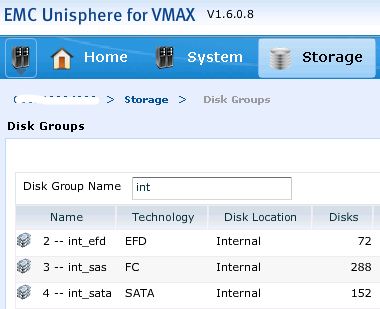
Firstly list the Disk Groups:
symdisk list -dskgrp_summary

DG_UNI

Ensure the TDAT’s are availbale and have not been used in another Pool by issuing the -nonpooled cmd. The output will also display the RAID configuration of the datadevs:
symdev list -datadev -disk_group 2 -nonpooled
symdev list -datadev -disk_group 3 -nonpooled
symdev list -datadev -disk_group 4 -nonpooled

Create the Thin Pools
The Thin Pools can be created first without adding data devices, TDATs are added at a later time.The Pool name can contain a sequence of 1 to 12 alphanumeric or ‘-‘ (hyphen) or ‘_’ (underscore) characters.:
symconfigure -sid xxx -cmd “create pool Prod-HP-R53 type=thin;” COMMIT
symconfigure -sid xxx -cmd “create pool Prod-GP-R14 type=thin;” COMMIT
symconfigure -sid xxx -cmd “create pool Prod-AR-R66 type=thin;” COMMIT

Populate the Thin Pools with the defined TDAT’s
After creating the Pools, TDAT’s are added to the Pools and enabled:
symconfigure -sid xxx -cmd “add dev 00F0:017F to pool Prod-HP-R53 type=thin, member_state=enable;” COMMIT
symconfigure -sid xxx -cmd “add dev 0180:05FF to pool Prod-GP-R14 type=thin, member_state=enable;” COMMIT
symconfigure -sid xxx -cmd “add dev 0600:0943 to pool Prod-AR-R66 type=thin, member_state=enable;” COMMIT

Using the list command to display a list of the Thin Pools created utilizing the –thin option:
symcfg list -pools -thin -gb

View details of the newly created Pools
In this example, the newly created Pool’s are displayed along with details about the pool and the data devices that have been added to it. The –detail option displays any bound thin devices:
symcfg show -pool “Prod-HP-R53” -thin -detail -GB
symcfg show -pool “Prod-GP-R14” -thin -detail -GB
symcfg show -pool “Prod-AR-R66” -thin -detail -GB

Pool_Details2

View of Thin Pools from Unisphere:

POOL_uni

EMC VNX – Second Generation (Rockies)

“32 Cores firing MCx Technology”

“Leverage cores and scale them – core scaling to achieve the million IOPS”

“Amdahl’s law 80% scaling”

“Up to 1.1 million IOPS (I/Os per second) performance, 30-GBps bandwidth, and 6 PB of capacity”

“Million IO’s a second with sub ms response time”

“7600 all flash offering up to 1/2 million IOPS”

“Dedupe lun by lun not the entire array”

“6x the number of VMs on a common system”

“VDM: Containerise your filesystem and move seamlessly”

“Improved FAST VP granularity to 256 MB”

“Second-generation VNX will be at the center of a new preconfigured Vblock converged infrastructure solution from VCE

These were just some of the highlights from the Second Generation VNX Launch.

In this post we will take a look at some of the changes in hardware focusing on DPE, SPE and the new CS.

The full range of VNX Models have been rearchitected with new hardware and software. The VNX OE releases are codenamed after mountain ranges with this latest release codenamed “Rockies”, more on VNX code naming schemes can be found on Chads blog post: EMC VNX Inyo: “Hello World!”.

The main components of Rockies:
• New “Megatron” Storage Processor Enclosure (SPE) – (VNX 8000)
• New “Jetfire” Disk Processor Enclosure (DPE) – (VNX 5400-7600)
• New “Dobie” Control Station (CS)
• Existing “Argonaut” Data Mover Enclosures (DME)
• Existing 15, 25, 60 drive Disk Array Enclosures (DAE)

Meet the new Range of VNX Models which are available in unified block and file, block only, or file only configurations:

VNX_MODELS“Not a refresh a re-architecture”

New Disk and Storage Processor Enclosures:

VNX_CPU

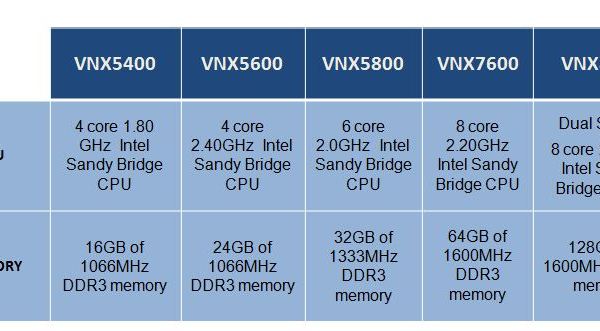
There is a new 3U Disk Processor Enclosure (DPE) containing two SPs with 25×2.5″ drives. This DPE (Jetfire) will be used in the 5400 to 7600 systems. As can be seen above there are different processing capabilities dependent on the model. Two 1100W power supplies, one per CPU module. Four fan packs, two per CPU module – Torque Limiting Screw (TLS) for removal/insertion.

7600_Front

7600_Rear

For the 8000 model there is a new 4U Storage Processor Enclosure (SPE) that holds the two SP’s. Each SP consisting of 2x8core 2.7GHz Intel Sandy Bridge CPUs (16Cores Total), 128GB of 1600MHz DDR3 memory, 11 I/O PCI-E Gen3 slots with 9 slots supporting FC, FCoE, and iSCSI and the other 2 slots reserved for back-end connectivity. An update to the SP OS allowed for these greater memory configurations. This gives a total of 32 cores, 22 I/O Slots and 256GB of memory across the 2 SPs if you compare this to a VNX7500 which has 12 cores, 10 PCI-E Gen2 I/O slots and 96GB of memory you have a serious increase in performance. Two 2U dual Li-Ion SPSs are also included with One SPS dedicated to the Megatron SPE and the other one used for vault DAE.

8000_Front

8000_Back

New Control Station (Dobie)
The new 1U Control Station codenamed “Dobie” is an upgrade from the Maynard CS providing enahanced Unisphere performance using a multi core processor: 4 Core 3.1GHz Xeon CPU and 8GB memory. The same Dobie CS will be used across all models. File side connectivity continues to be provided for by the Argonaut X-Blades.

DOBIE

POOL Configurations
VNX2_PoolMax

Control Station Cabling
The new CS has the same level of connectivity as the Maynard CS with the only change being the location of the IPMI and CS A ports being swithced:
cs
cs_index

CS_Pic

EMC VNX Terminology

Here I have compiled a list of the most commonly used VNX Terms and a brief description of each.

Term: Definition

SP: Storage Processor – provides access to all external hosts and the file side of VNX.
SP A: Storage processor A – Generic term for the first storage processor in VNX for block.
SP B: Storage processor B – Generic term for the second storage processor in VNX for block.
SPE: Storage Processor Enclosure.
DAE: Disk Array Enclosure.
DPE: Disk and Processor Enclosure, containing both storage processors and disk drives.
DME: Data Mover Enclosure – includes one or two Data Movers.
DM: Data Mover – enclosure component (X-Blade) running VNX Operating Environment for File.
VDM: Virtual Data Mover – File software feature that enables users to administratively separate CIFS servers, replicate CIFS environments, and move CIFS servers from one Data Mover to another.
FE: Frond End – communication ports from the hosts to the SP.
BE: Back End – ports connecting the SP to the back-end bus(es) and drives.
CRU: Customer-replaceable unit – a hardware component that can be replaced as an entire unit.
FRU: Field-replaceable unit – a hardware component that can be replaced as an entire unit.
SLIC: Small I/O Card – containined within SP or DM. SLIC options include 10GbE, Fibre Channel, iSCSI, SAS.
SAS: Serial Attached SCSI – A point-to-point serial protocol for moving data to drives. A higher speed serial version of SCSI.
NL-SAS: Near-Line SAS drives have the highest capacity and the lowest speed (7200 RPM)
EFD: Enterprise Flash Drive – a semiconductor-based storage device. Highest performing storage device.
SPS: Standby Power Supply – battery system used to provide power to VNX for block during a power outage.
LCC: Link Control Card – cards used in the DAE for connectivity to SP or another DAE on the BE.
DART Data Access in Real Time – the operating system software that runs on the Data Mover.
FLARE: Fibre Logic Array Runtime Environment – block side operating system.
Gatekeeper: Logical disk used as a buffer between VNX for file and the Symmetrix system for the exchange of management commands and data.
FLU: FLARE LUN – traditional Raid Group LUN.
PFS: Production File System – built on Symmetrix volumes or VNX for Block LUNs and mounted on a Data Mover in the VNX for File.
Cache: Memory used by the storage system to buffer read and write data and to insulate the host from drive access times.
Cache hit: When a host sends read or write operations directly to cache.
Cache miss: When data requested by the host is not found in the cache, resulting in a disk request.
Dirty Page: A cache page not yet written to disk.
Write-aside: Bypass of the write cache with the write immediately sent to the disks.
Write-aside size: The largest IO size that can be written to cache. Any IO larger goes straight to disk.
Reason Code: A code which represents the state of Control Stations and Data Movers.
SnapSure: On the VNX for file, a feature that provides read-only, point-in-time copies, also known as checkpoints, of a file system.
SnapSure SavVol: The volume to which SnapSure copies original point-in-time data blocks from the Production File System (PFS) before the blocks are altered by a transaction. SnapSure uses the contents of the SavVol and the unchanged PFS blocks to maintain a checkpoint of the PFS.
TLU: Thin Provisioned LUN.
Voyager: 60 Drive (3.5”) SAS Enclosure supports SAS and SATA.
Viper: 15 Drive (3.5”) SAS Enclosure supports SAS and SATA.
Derringer: 25 Drive (2.5”) SAS Enclosure supports SAS and SATA.
VIA: VNX Installation Assistant – A client-based GUI interface used to pre-configure a freshly installed VNX and run a system health check at time of installation.
Vault: Reserved area on disks for system files and cache dumps.
DLU: Direct LUN – also known as a VP Pool Thick LUN.
FAST: Fully Automated Storage Tiering.
FAST Cache: Secondary I/O cache composed of Flash drives.
Flush: Writing the data in the write cache to the drives.
Throughput — IOPS: Input/output operations per second.
Large-block: I/O operations with capacities greater than 64 KB.
MirrorView: Data replication software.
Analyzer: Performance analysis software.
NDU: Non-disruptive update – Upgrading system software while applications are running with minimal effect on the application performance.
Prefetch: A caching method by which some number of blocks beyond the current read request are read and cached in the expectation of future use.
Rebuild: The reconstruction of a failed drive’s data through either parity or mirroring.
Sector: The smallest addressable unit on a hard drive; a sector contains 512 bytes of data.
Short stroking: A LUN performance optimization technique of only using a portion of a RAID group.
Trespass: A multipathing host-initiated change in SP LUN ownership as a result of a failure or command.
Unisphere: Web administrative tool for FLARE revisions 30.0 and later.
DUMP: A quick copy of the cache image to vault disks (fault protection).
Forced Flush: Flush due to incoming write not having an empty page to write to (not optimized but fastest method of flushing to data drives).
Watermarks: Low and high watermarks are set to avoid forced flushes while maximizing write cache hits.
SnapView: A point-in-time copy application.
Snapshot: Backup copy of how a LUN looks at a particular point in time.
Stripe: Distributing sequential chunks of storage across many drives in a RAID group.
USM: Unisphere Service Manager – is a desktop application that is used to upgrade, install and maintain the hardware and software of a storage system.
Coalesce: Grouping together multiple smaller I/O’s into one larger I/O.